Transform Your Next Pitch with Heliocraft Google Slide Template
We’ve all been there: staring at a blank slide deck, trying to conjure a presentation that looks polished and professional without spending hours fiddling with alignment. Whether you’re pitching a new service to a client, presenting quarterly results to your team, or sharing your creative portfolio, the visual foundation of your slides matters just as much as the content. A disjointed or amateurish layout can distract from your message, while a cohesive, well-designed template helps your ideas land with clarity and impact. That’s where a thoughtfully crafted resource like the Heliocraft Google Slide Template comes into play—it’s designed to remove the friction from creating visually consistent, engaging presentations.
A Visual Toolkit Built for Real-World Projects
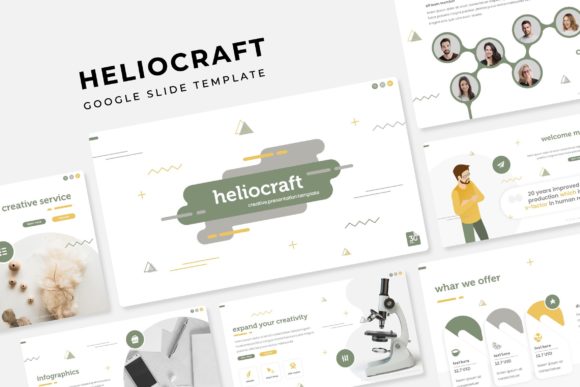
What immediately stands out about this template is its sheer versatility. With over 150 total slides across five premade color themes, you get a substantial library of layouts tailored for different purposes. Each color variation includes 30 unique slides, so you’re not just getting a single style repeated—you have genuine variety to choose from. The handcrafted infographics are particularly useful for anyone who needs to present data, processes, or timelines in a way that’s both informative and visually appealing. Instead of settling for generic clip art or struggling to build charts from scratch, you can drag and drop your own content into clean, pre-structured graphics that resize without losing quality.
For professionals in branding, marketing, or creative fields, this kind of template is more than a timesaver—it’s a strategic asset. Imagine you’re a small business owner preparing a pitch for potential investors. You need your brand’s colors, fonts, and visual language to be consistent throughout the deck. With Heliocraft, you can select the color theme that aligns with your brand guidelines and use the master slides to ensure every element looks intentional. The pixel-perfect illustrations and editable graphic placeholders mean you can insert your own product shots, team photos, or mockups without worrying about awkward cropping or misaligned text boxes. This level of control helps reinforce brand recognition and makes your presentation feel professionally designed, even if you’re not a trained designer.
Practical Applications Beyond the Boardroom
While presentations are the obvious use case, the structure of these slides lends itself to a range of creative and professional projects. Content creators and bloggers can use the portfolio and gallery slides to showcase work samples or curated visual collections. Social media managers might adapt individual slides into standalone graphics for Instagram carousels or LinkedIn posts, maintaining a cohesive aesthetic across platforms. The section break slides are handy for dividing longer presentations into digestible chapters, which is especially useful for webinars, online courses, or workshop materials.
For those involved in packaging design or editorial layouts, the clean grid systems and balanced typography within the template can serve as a starting point for mockups. You could present a new product line using the gallery slides, or outline a marketing campaign using the infographic sections to map out customer journeys or campaign timelines. The fact that everything is based on master slides means you can make global changes efficiently—update a color accent or font style once, and it applies throughout the entire deck. This consistency is crucial for maintaining a professional appearance, especially when you’re collaborating with clients or stakeholders who expect polished deliverables.
Design Details That Make a Difference
One of the subtler strengths of Heliocraft is its attention to typographic hierarchy and whitespace. The slides aren’t cluttered with unnecessary elements; instead, they use strategic spacing and clear visual pathways to guide the viewer’s eye. This is vital for readability, particularly in live presentations where audiences have only a few seconds to absorb each slide. The included free font download links are a practical touch, ensuring you can maintain the intended look without hunting for compatible typefaces. Pairing these fonts with your own brand fonts can create a unique yet harmonious visual identity.
If you’re working on digital products or marketing assets, the resizable and editable graphics are a standout feature. You can adapt a single infographic slide to fit different contexts—perhaps a vertical version for a Pinterest pin or a cropped section for an email header. The drag-and-drop functionality simplifies the process of inserting your own images, which is especially helpful for those who aren’t deeply familiar with advanced presentation software. This flexibility makes the template a valuable resource for entrepreneurs and freelancers who need to produce a variety of visual content quickly without sacrificing quality.
Getting the Most Out of Your Template
To truly leverage a tool like this, it helps to approach it with a clear goal in mind. Before diving into slide selection, take a moment to outline your presentation’s narrative arc. Are you leading with a problem statement and ending with a solution? Are you showcasing a portfolio and concluding with client testimonials? Mapping out your content flow will help you choose the most effective slides and avoid overcrowding your deck with unnecessary visuals. Experiment with different color themes to see which best complements your brand’s palette—sometimes a subtle shift in accent color can make a significant difference in mood and professionalism.
Remember, too, that the best presentations balance consistency with variety. Use the master slides to establish a cohesive look, but don’t be afraid to mix in different layouts to keep your audience engaged. The section break slides are perfect for creating natural pauses and transitions, while the infographic slides can simplify complex information into digestible visuals. Always preview your slides in presentation mode to check for readability and pacing, ensuring that text is large enough and that animations or transitions don’t distract from your core message.
Ultimately, a well-structured template like Heliocraft Google Slide Template isn’t about doing the work for you—it’s about giving you a professional foundation to build upon. By handling the heavy lifting of design and layout, it frees you up to focus on what really matters: telling your story, sharing your vision, and connecting with your audience in a visually compelling way. Whether you’re refining a business proposal, creating educational content, or developing a brand identity system, having a versatile and polished slide deck at your fingertips can make all the difference in how your ideas are received.