Streamline Your Presentations with Areva Keynote Template
Every professional has been there: staring at a blank slide deck, hours before a critical meeting, wondering how to transform a complex idea into a clear, visually engaging story. The pressure to look polished and professional is immense, yet the tools we often use default to bland, uninspired layouts. This is where a thoughtfully designed asset like the Areva Keynote Template shifts from being a nice-to-have to an essential part of your workflow. It’s not just about having pretty slides; it’s about communicating with clarity and confidence, saving precious time, and presenting your ideas in a way that resonates and persuades.
A Foundation Built for Clarity and Impact
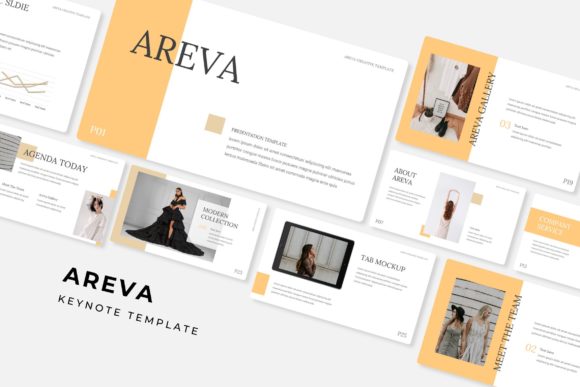
What immediately sets the Areva template apart is its commitment to structured versatility. With 150+ total slides organized across 5 premade color themes, it provides a robust starting point for nearly any topic. Each color variation contains 30 meticulously crafted slides, ensuring visual consistency from the first title slide to the final thank-you. This isn't a collection of random layouts; it's a cohesive system. The slides are built upon Master Slides, a feature that guarantees every element—from fonts to color palettes—stays perfectly aligned. This foundation is crucial for maintaining a professional brand identity across multiple presentations, ensuring your company or personal brand looks reliable and established.
Furthermore, the inclusion of handcrafted infographics and section break slides elevates the template from a simple layout pack to a comprehensive communication tool. Infographics allow you to distill data, processes, and timelines into digestible, memorable visuals. Instead of listing bullet points about market growth, you can show it with an elegant, easy-to-understand chart. The dedicated gallery and portfolio slides are a game-changer for creatives, consultants, and agencies. They provide a clean, focused space to showcase work samples, client testimonials, or product features, making your case studies and portfolios look exceptionally curated.
Practical Flexibility for Real-World Projects
The true value of a design asset lies in its adaptability. Areva’s resizable and editable graphics with picture placeholders that support drag & drop functionality mean you are not locked into a rigid structure. Need to swap an image? Simply drag your photo into the designated area. Want to adjust a diagram to fit your specific data? The vector graphics can be scaled without losing quality. This level of customization empowers you to tailor every slide to your exact message, rather than forcing your content into a pre-set box. The pixel-perfect illustrations ensure that even after edits, every line, icon, and shape remains crisp and professional on any screen, from a laptop to a large conference room projector.
This practicality extends to the package itself. Receiving 5 PPTX files in both standard and widescreen formats ensures compatibility across different devices and presentation settings. The inclusion of a Readme First file and free font download links removes the frustrating guesswork that often accompanies new design resources. You can install the recommended typefaces immediately, ensuring the template looks exactly as intended from the moment you open it. It’s these thoughtful details that reduce setup friction and let you focus on what matters: your content.
Beyond the Boardroom: Unexpected Applications
While designed for presentations, the components of the Areva Keynote Template are incredibly useful for broader marketing assets and brand identity projects. Consider using the infographic elements to create standalone social media graphics. A process slide can be easily adapted into an informative Instagram carousel or a LinkedIn article header. The clean, modern typography and consistent color schemes make it simple to extract single slides or elements to maintain visual harmony across your entire digital presence.
For small business owners and entrepreneurs, this template can serve as a cornerstone for your visual communication toolkit. Use the portfolio slides to build a compelling case study PDF for potential clients. Adapt the section breaks into elegant headers for a company brochure or a product catalog. The consistent design language helps build brand recognition; when your pitch deck, your social media, and your one-pagers share the same visual DNA, your brand becomes more memorable and professional in the eyes of your audience. This cohesion is a subtle yet powerful form of visual consistency that builds trust.
Choosing and Implementing Your Template Wisely
When integrating a template like Areva into your projects, a strategic approach yields the best results. First, review the included font styles thoroughly. Are they sans serif fonts for modern clarity, or do they include serif fonts for a more traditional feel? Understanding their personality helps you match typography to your project goals. A fintech startup might lean on the clean, geometric sans serifs, while a law firm could emphasize the serif options for authority. Always test font pairings with your own content to ensure readability—especially for body text in longer paragraphs or smaller on-screen notes.
Next, consider licensing. The template is listed as a commercial font asset, which typically means you can use it for client work and commercial projects, but it’s vital to read the specific license agreement included in your download to understand any restrictions. When you begin customizing, resist the urge to use every feature at once. A powerful presentation often uses restraint. Select the color theme that best aligns with your brand or the mood of your message. Use the handcrafted infographics to simplify your most complex ideas, not to decorate simple ones. The goal is to use the template’s structure to enhance your narrative, not overshadow it.
Ultimately, a resource like the Areva Keynote Template is an investment in efficiency and professionalism. It provides a polished, premade canvas that respects your time while elevating your output. By understanding its components—from the Master Slides to the editable graphics—and applying them thoughtfully to your unique branding, packaging, or editorial needs, you transform a simple slide deck into a powerful tool for connection and persuasion. It’s about having the right visual language at your fingertips, ready to articulate your ideas with the clarity and impact they deserve.