Lumino Keynote Template: Your Blueprint for Polished Presentations
Let’s be honest: building a presentation from scratch is a chore. You spend hours aligning text boxes, fiddling with color palettes, and searching for icons that don’t look like they were made in 1998. For the small business owner, the marketer, or the creative freelancer, time is the one resource you can’t get back. This is where a structured design asset stops being a luxury and becomes a necessity. The Lumino Keynote Template isn’t just about making slides look pretty; it’s about streamlining your workflow so you can focus on your message rather than pixel placement.
Visual Consistency Across 150+ Slides
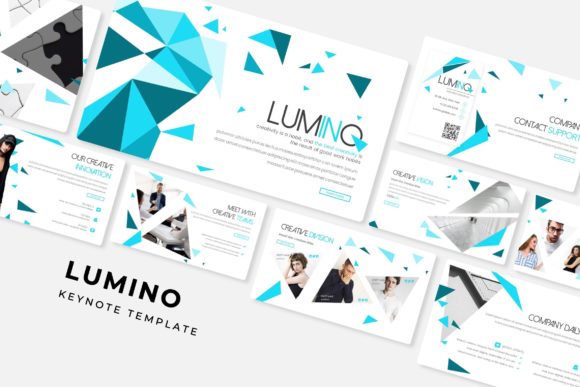
The core value of the Lumino Keynote Template lies in its massive library of over 150 total slides. In the world of branding and visual communication, consistency is king. Whether you are pitching a new client, launching a digital product, or presenting quarterly results, the visual language needs to stay uniform. With Lumino, you get 30 unique slide designs for each of the five premade color variations. This ensures that your deck doesn't start to look repetitive or disjointed halfway through. You aren't just getting a static file; you are getting a comprehensive design system that adapts to the flow of your narrative, keeping your audience engaged from the first "Hello" to the final "Q&A."
Adapting to Your Brand Identity
One of the biggest hurdles in using templates is the fear of looking generic. However, the Lumino Keynote Template is built on Master Slides, which means the architecture is deeply editable. The five premade colors are a starting point, not a final destination. Because the graphics are resizable and editable, you can swap out the color schemes to match specific brand guidelines in minutes. This is particularly useful for agencies or freelancers who manage multiple client identities. You can take the "Pixel-perfect illustrations" included and tweak them to ensure they align with the specific typography and hue requirements of your current project, maintaining that professional polish that clients expect.
Practical Applications Beyond the Boardroom
While this is technically a presentation file, the assets included in Lumino are versatile enough to serve broader marketing needs. Think about the "Handcrafted Infographic" sections. These aren't just for slides; they are high-quality vector elements that can be screenshotted or exported for use in social media graphics, blog posts, or even printed materials.
For instance, if you are a content creator looking to explain a complex process on Instagram or a blogger trying to visualize data, these infographics provide a ready-made solution. Similarly, the "Gallery and Portfolio slide" layouts are perfect for visual storytellers. If you are a photographer, an interior designer, or a crafter, you can use the drag-and-drop picture placeholders to create a digital lookbook that you can share as a PDF rather than just presenting live. It transforms the Keynote file from a simple presentation tool into a digital product creation engine.
Streamlining the Design Workflow
Time spent fighting with software is time spent away from your business. The Lumino Keynote Template addresses this with "Picture Placeholder" technology. Instead of manually cropping and resizing images to fit a specific frame, you simply drag your photo into the designated area, and the template does the heavy lifting. This is a game-changer for those who need to produce high-volume content, such as marketing teams preparing weekly updates or educators creating course materials. The "Section Break Slides" also help in organizing thoughts logically, allowing you to segment your presentation into digestible chapters that improve readability and audience retention.
Technical Considerations and Usability
For those who aren't design wizards, the technical specs of a template matter. Lumino is built to be user-friendly. The inclusion of a "Readme First" file and free font download links eliminates the guesswork often associated with premium design assets. You don't have to worry about missing fonts breaking the layout or licensing issues down the road, as the necessary typefaces are clearly indicated.
It is important to note, however, that while the template is robust, the photographs used in the preview are for illustration purposes only. This is standard practice, but it means you need to have your own library of high-resolution images ready to go. Whether you use stock photography or your own original content, the "Widescreen" format (16:9) ensures that your visuals will look crisp on modern monitors and projectors, maintaining that pixel-perfect clarity that defines a professional presentation.
Choosing the Right Style for Your Message
With five distinct color variations and over 150 slides, the challenge shifts from "how do I build this?" to "which style fits my story?" The selection of colors in Lumino ranges from professional and corporate to vibrant and creative. When choosing your variation, consider the psychology of color and the context of your meeting. A financial report might benefit from a more subdued, high-contrast palette to ensure readability, whereas a brand launch for a lifestyle product might call for the more energetic color schemes provided.
Ultimately, the Lumino Keynote Template serves as a bridge between amateur effort and professional output. It provides the structure of a master slide deck while offering the flexibility required for custom branding. By handling the heavy lifting of design and layout, it frees you up to do what you do best: tell your story, sell your vision, and connect with your audience. Whether you are packaging a new service, presenting a portfolio, or teaching a class, having a reliable, editable, and comprehensive template in your toolkit is an investment in your professional image.