Qudaku: A Flexible Google Slides Template for Professional Decks
Building a presentation that looks like it came from a high-end agency usually requires a massive budget or hours of pixel-pushing in design software. Most business owners and creators don't have the luxury of spending a full workday just on the visual structure of a slide deck. If you have ever found yourself fighting with text boxes that won't align or struggling to make a data chart look clean, you know the frustration. The Qudaku Google Slide Template solves this by offering a robust, pre-designed framework that balances aesthetic appeal with raw functionality. It is not just a collection of empty pages; it is a comprehensive design system intended to make your message land with clarity and impact.
Visual Consistency Across 150+ Slides
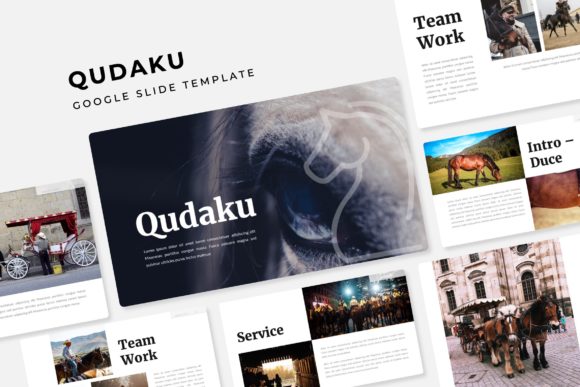
The first thing you notice about a professional brand is consistency. When colors shift or fonts change mid-presentation, it creates a subtle sense of unease for the viewer. The Qudaku template addresses this head-on with a massive library of over 150 total slides. This volume is essential for anyone building a long-term brand identity or pitching a complex business model. You aren't just getting a handful of layouts; you are getting a full suite of options that covers everything from introductory statements to detailed data breakdowns.
What makes this particularly useful is the "Master Slides" architecture. This means the design logic is baked into the background, ensuring that every element you add adheres to a strict grid. This is crucial for maintaining that pixel-perfect look across your entire narrative. Whether you are presenting a quarterly report or a new product launch, the structural integrity of the deck remains solid. The template includes five premade color variations, with 30 distinct slides dedicated to each colorway. This allows you to switch the entire mood of your presentation with a single click, adapting to different brand guidelines or audience preferences without having to manually recolor individual elements.
Practicality for the Modern Creator
For entrepreneurs and marketers, time is the most valuable currency. The Qudaku template is built around the concept of drag-and-drop efficiency. The graphic elements and picture placeholders are fully resizable and editable. This means you don't need to be an expert in vector graphics to get professional results. If you need to swap out a stock photo for your own team shot, you simply drag your image into the placeholder, and the template automatically crops and fits it to the frame.
This functionality extends to the infographics included in the package. Data visualization is often the hardest part of a presentation to get right. You want your numbers to be understood instantly. The handcrafted infographics in this set are designed to simplify complex information, turning dry statistics into engaging visual stories. From flowcharts to comparison tables, these assets help you communicate your value proposition effectively. This is particularly helpful for social media managers who need to export slides as static images for LinkedIn carousels or Instagram posts, ensuring that the design holds up even outside of the presentation software.
Adapting the Template to Your Brand
Choosing the right design assets is about more than just aesthetics; it’s about finding a tool that aligns with your specific project goals. The Qudaku Google Slide Template is versatile enough to serve a wide range of applications. A graphic designer might use it as a base for a client’s brand guidelines deck, while a small business owner might use it to create a professional lookbook for investors. The inclusion of specific section break slides helps to organize the flow of information, preventing the "wall of text" effect that plagues so many corporate presentations.
When working with this template, consider the typography choices carefully. While the template comes with a Readme file and links to the specific fonts used, you have the freedom to experiment with your own typeface pairings. If your brand uses a specific sans serif for headings and a serif for body text, you can apply those changes globally through the master slide editing feature. This ensures that while the structure of the deck is professional, the voice remains distinctly yours.
What’s Included and How to Use It
When you download this package, you receive a comprehensive set of files designed for immediate deployment. The package includes five distinct PPTX files, optimized for widescreen presentations. This compatibility means you can work within PowerPoint or upload them directly to Google Slides for cloud-based collaboration. The "Readme First" file is a valuable inclusion, providing direct download links for the free fonts used in the design. This is a detail often missed in premium templates, but it is vital for ensuring that the text renders exactly as the designer intended.
It is important to note the usage rights regarding the visual assets. While the template design is yours to use for commercial projects, the photographs and placeholder images shown in the preview are for illustration purposes only and are not included in the download. This is standard practice in the design asset industry, allowing the creator to keep the file size manageable while respecting the licensing of stock photography. You will need to supply your own high-quality images to fill the gallery and portfolio slides, but given the clean structure of the placeholders, even standard smartphone photos can look high-end when framed correctly.
Beyond the Presentation
Think of this template not just as a slide deck, but as a content engine. The slides can be repurposed into PDF reports, digital brochures, or even the basis for a website layout. The clean lines and modern aesthetic make it a strong foundation for any visual communication strategy. By starting with a strong structural base like Qudaku, you free up your mental energy to focus on what really matters: the story you are telling and the connection you are building with your audience. It turns the chore of designing a presentation into an opportunity to reinforce your brand’s professionalism and attention to detail.