Metrico: The Presentation Template That Saves Your Sanity
You know that sinking feeling. It’s 9 PM, and you’re supposed to have a killer presentation ready for a client meeting at 8 AM tomorrow. You open a blank PowerPoint file, stare at the blinking cursor, and realize you have zero inspiration for the layout. You spend the next three hours moving text boxes around, trying to align icons, and wondering why the colors look muddy. It’s a time sink, a creativity killer, and frankly, exhausting. This is exactly the scenario where having a robust design system like the Metrico Power Point Template in your arsenal changes the game entirely. It’s not just about having pretty slides; it’s about reclaiming your time and ensuring your visual communication is sharp, professional, and persuasive.
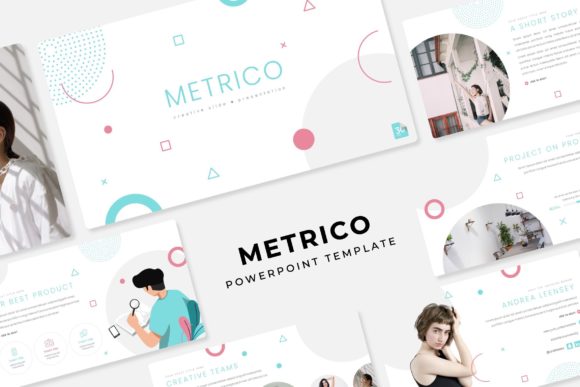
The core appeal of a system like Metrico lies in its structure. With over 150+ total slides organized across 5 premade colors, you aren't just buying a static file; you are investing in a flexible design ecosystem. For small business owners or content creators, this variety is crucial. You might need a clean, minimalist aesthetic for a pitch deck to investors, but a vibrant, high-energy look for a social media strategy presentation the next week. Because Metrico offers 30 unique slides for each template variation, you have the depth to tell complex stories without repeating the same tired layout slide after slide. It allows you to maintain a cohesive visual identity across different departments or campaigns without reinventing the wheel every time.
Visual Consistency and Brand Recognition
One of the biggest hurdles in building a strong brand identity is consistency. We often see businesses with a beautiful logo but a disjointed presentation style that confuses their audience. The Metrico Power Point Template solves this by providing a unified design language. When you utilize Master Slides correctly, you ensure that every element—from the placement of your header to the font size of your footnotes—is pixel-perfect. This consistency builds trust. When a client or investor sees that your typography, color palette, and imagery are aligned, they subconsciously perceive your business as more organized and reliable.
Think about your marketing assets. Whether you are designing a pitch deck, a monthly report, or a workshop guide, the visual thread needs to remain intact. The 5 color variations included in this package are designed to help you adapt to different contexts while staying on brand. Perhaps you use the dark mode version for evening webinars to reduce eye strain, and the light, airy version for daytime corporate meetings. By switching the color palette but keeping the structural integrity of the handcrafted infographics, you maintain brand recognition while tailoring the experience to the environment. This kind of adaptability is essential for modern entrepreneurs who juggle multiple platforms and audiences.
The Power of Drag-and-Drop Efficiency
Let’s talk about the actual workflow. We’ve all used templates that claim to be "editable" but end up being a nightmare to modify. You try to move one element, and the whole slide breaks. A defining feature of a high-quality Power Point Template is the use of Picture Placeholders. Metrico is built on this principle. The drag-and-drop functionality means you don’t need to be a design wizard to create something that looks custom-made.
Imagine you are a real estate agent or a photographer. You need to showcase high-resolution images of properties or portfolios. With the Gallery and Portfolio slides included in Metrico, you simply click the image icon, select your photo, and it automatically crops and scales to fit the design frame perfectly. No manual resizing, no awkward stretching. This saves a massive amount of time, especially when you are working under a deadline. Furthermore, because the graphics are resizable and editable, you aren't stuck with fixed icons. If a specific icon doesn't represent your industry, you can easily swap it out or resize it without losing quality. This flexibility turns the template into a custom design tool rather than a rigid cage.
Practical Applications Beyond the Boardroom
While we often associate PowerPoint with corporate meetings, the versatility of the Metrico system extends much further. Consider the needs of a content creator or a blogger. You can use these slides to create "quote graphics" for Instagram or LinkedIn. The Section Break Slides are particularly useful here; they are designed with bold typography and striking layouts that translate beautifully into static social media posts. Instead of spending hours in Photoshop trying to align text, you can type your quote into a pre-formatted text box and export the slide as an image.
For educators and course creators, the Pixel-perfect illustrations and clean layouts help break down complex information. When you are teaching a concept, visual hierarchy is everything. The pre-built infographics allow you to visualize data, timelines, and processes without cluttering the screen. This leads to better audience engagement and higher retention rates among your students or clients. It’s about using design to facilitate understanding, not just to decorate.
Technical Assets and Licensing
When investing in design assets, the technical details matter. A common frustration is purchasing a template only to find out it uses a premium font that costs an extra $50 to license. The creators of Metrico have addressed this by utilizing free fonts. The package includes a Readme First file with direct download links for the typefaces used. This ensures that when you open the PPTX files (which are provided in both standard and widescreen formats), the text renders exactly as the designer intended. You won't be greeted with missing font warnings or awkward substitutions that ruin your layout.
It is also vital to understand what is included in your license. While the Metrico Power Point Template is yours to use for your projects, the standard industry practice for these types of digital products is that the stock photography used in the previews is for illustration purposes only. This is actually a benefit—it means you aren't paying for a license for photos you might not need. It encourages you to insert your own high-quality images, which makes the presentation truly yours and more relevant to your specific brand story. Always ensure you have the rights to the images you upload, but rest assured that the vector graphics and layouts within the template are ready for your commercial or personal use.
Refining Your Visual Communication
Ultimately, the goal of any visual asset is to support your message. A premium font or a sleek template should never overshadow the content; it should elevate it. When using Metrico, pay attention to readability. Just because a slide offers a lot of space doesn't mean you should fill it with paragraphs of text. Use the Modern typography to create impact with fewer words. Let the infographics do the heavy lifting for data visualization.
As you work through your slides, think about the flow of information. Use the Section Break Slides to give your audience a mental pause and signal a shift in topic. This pacing is crucial for keeping attention spans high, particularly in virtual presentations where distractions are everywhere. By leveraging the 5 premade color schemes, you can also use color psychology to your advantage—using calming blues for financial data and energetic reds for calls to action.
In a digital landscape where visual noise is at an all-time high, having a structured, professional, and flexible design system is no longer a luxury; it's a necessity. Whether you are closing a sale, teaching a class, or pitching a new idea, the Metrico template provides the scaffolding you need to present your best self with confidence and clarity. It strips away the technical barriers of design, allowing you to focus on what really matters: your message.