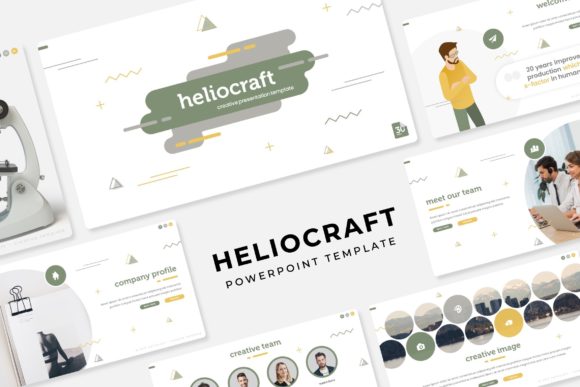
Heliocraft Power Point Template: A Game-Changer for Presentations
Ever sat down to build a presentation and felt your creative energy drain away before you even picked a color? We've all been there—staring at a blank slide deck, trying to piece together something that looks polished without spending hours on alignment, color theory, and layout. The Heliocraft Power Point Template eliminates that friction entirely. With over 150 handcrafted slides, five premade color schemes, and pixel-perfect infographics, it hands you a professional visual foundation so you can focus on what actually matters: your message.
What Makes This Template Stand Out
Most PowerPoint templates give you a handful of generic layouts and call it a day. Heliocraft takes a different approach. Each of the five color variations includes 30 unique slides, meaning you're working with 150 total slides that have been individually designed rather than auto-generated. The infographics aren't clip art—they're handcrafted illustrations built specifically for professional contexts like quarterly reports, product launches, and investor pitches.
The structure itself is thoughtful. Section break slides let you organize complex narratives without losing your audience. Gallery and portfolio slides give creatives—photographers, designers, agencies—a ready-made showcase. And because everything is based on master slides, making global changes to fonts, colors, or layouts takes seconds rather than minutes. You drag, you drop, you resize. The picture placeholders are editable, so swapping in your own imagery feels seamless rather than like a puzzle.
Practical Uses Across Industries
A template like this isn't just for corporate boardrooms. Consider a small business owner preparing a pitch for local investors. Instead of cobbling together something in Canva or hiring a freelancer, they open Heliocraft, pick a color scheme that matches their brand, and populate the slides with their own data and images. The result looks like it came from a design agency.
Content creators and bloggers can use the portfolio slides to build media kits. Social media managers can extract individual slides as standalone graphics for LinkedIn carousels or Instagram stories. Marketing teams can standardize their internal presentations so every department speaks the same visual language. Even educators and workshop facilitators benefit—the clean layouts make information digestible, and the infographic slides turn abstract data into something audiences actually absorb.
Here's where it gets interesting for branding work. If you're developing a brand identity, the five premade color palettes give you a starting point for exploring how different tones affect perception. A warm palette reads differently than a cool one. Testing those variations inside a real presentation context—rather than on a mood board—helps you see how colors behave when they're carrying real content.
Building Visual Consistency Without the Overwhelm
One of the hardest parts of maintaining a professional image is consistency. Your pitch deck should feel like it belongs to the same brand as your website, your social media, and your print materials. When every touchpoint looks slightly different, trust erodes. Heliocraft solves this by giving you a unified system. The master slide architecture means that once you set your brand fonts and colors, every slide inherits those choices automatically.
This matters more than people realize. A freelancer presenting to a potential client, a startup pitching to venture capitalists, a nonprofit sharing impact reports with donors—each of these scenarios depends on perceived professionalism. Sloppy alignment, mismatched fonts, or amateurish color choices send a signal that you didn't invest the time. A well-structured template removes that risk entirely.
The widescreen format is another practical detail worth noting. Standard 4:3 presentations feel dated on modern monitors and projector setups. The 16:9 widescreen files included with Heliocraft match what audiences expect today, which means your content fills the screen properly without awkward black bars or stretched graphics.
Getting the Most Out of the Included Assets
The package ships with five PPTX files, each representing a different color variation. Before you start customizing, spend ten minutes reviewing all five. Sometimes the palette you'd instinctively choose isn't the one that actually serves your content best. A high-contrast dark scheme works beautifully for tech presentations, while a softer pastel variation might suit a wellness brand or lifestyle pitch.
The readme file and included font download link are there for a reason—use them. Missing fonts are the number one cause of presentations breaking when shared across computers. Installing the specified fonts before you begin ensures everything renders correctly on your machine and anyone else's. It's a small step that prevents a big headache later.
When it comes to the editable picture placeholders, resist the urge to use low-resolution images. The drag-and-drop functionality makes it tempting to grab whatever's handy, but your presentation quality is only as strong as your weakest visual. Source high-resolution images from free stock libraries or use your own photography. The template's clean layouts give images room to breathe, so strong photography really shines.
Why Thoughtful Design Assets Save Real Time
Time is the resource most professionals underestimate. Building a 30-slide presentation from scratch—choosing layouts, aligning elements, selecting colors, creating infographics—easily consumes a full workday. Heliocraft compresses that timeline dramatically. You're not designing; you're curating. You're selecting the best layout for each section of your narrative and filling it with your content.
For agencies and freelancers who produce presentations regularly, this kind of template becomes infrastructure. It's not a one-time purchase you forget about. It's a system you return to project after project, adapting the color scheme and content to each client's needs. The five variations alone give you enough range to avoid visual repetition across different clients.
The resizable and editable graphics deserve special mention here. Unlike templates where infographics are locked or flattened, Heliocraft's elements can be adjusted to fit non-standard data sets. Need to add a sixth bar to a chart? Extend a timeline? Modify an icon? The vector-based approach means you can scale and edit without quality loss. That flexibility separates a useful template from a restrictive one.
Final Thoughts on Choosing Presentation Tools
No template replaces good thinking. The most beautifully designed slide deck falls flat if the underlying message is muddled or the data is weak. What Heliocraft does is remove the design barrier between your ideas and their visual expression. It gives you a professional canvas that's ready to hold whatever you need to communicate.
Whether you're a designer building decks for clients, an entrepreneur preparing for a pitch competition, or a marketer standardizing your company's presentation library, having a reliable, well-structured template in your toolkit pays dividends over time. The combination of variety, editability, and thoughtful organization makes this particular asset worth serious consideration for anyone who presents ideas professionally.